01
Prepare a Token and prompt
Get a temporary Token without signing in, save it to the project .env, and send the deployment prompt to an Agent on the service machine.
Copy one deployment prompt to publish your local service at a public HTTPS address. No dedicated public IP or manual certificate setup; expose only explicitly selected routes, then review, disable, or delete them at any time.
See the Agent one-line deployment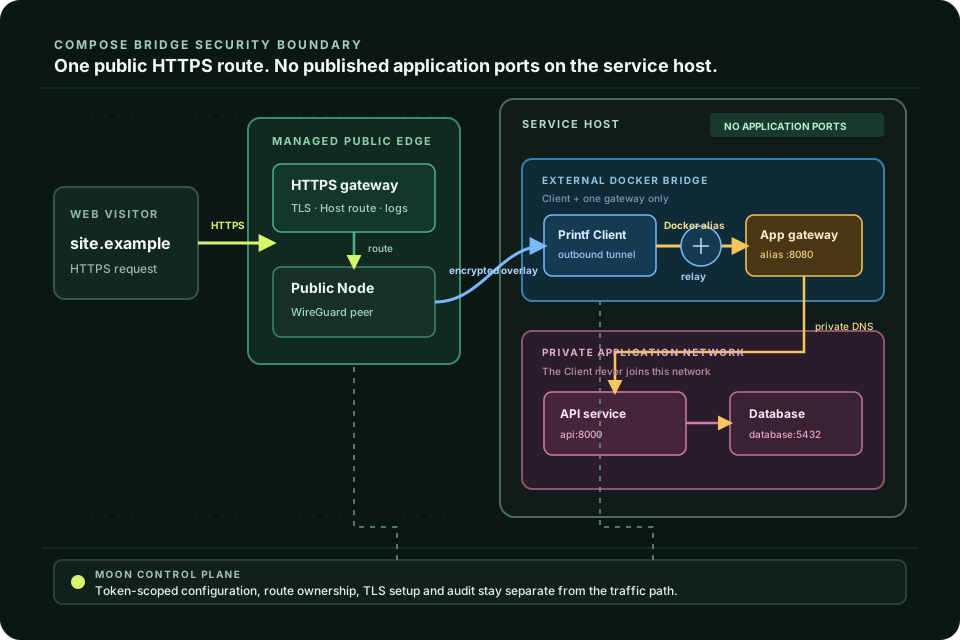
From local process to public link
An Agent can prepare the deployment, but Lprintf still makes the trust boundary explicit: connect the client, choose the target, verify the link, then remove it.
Get a temporary Token without signing in, save it to the project .env, and send the deployment prompt to an Agent on the service machine.
Set a readable subdomain and target port. The gateway handles HTTPS and forwards only the route you configure.
Check online status and traffic, then disable or delete a mapping when the link is no longer needed.
Security is part of the workflow
A public link changes the trust boundary. Lprintf keeps it narrow by avoiding a direct inbound port on your service and requiring an explicit route before anything is public.
Your service does not need its own public listener. The Client connects out to the managed gateway; the gateway exposes only configured HTTPS routes.
The platform never scans or publishes local ports on your behalf. A mapping exists only after you choose its target and name.
TLS, domain routing and access logs stay at the managed gateway instead of being copied into every local service.
Delete or disable mappings when work ends. The safest public endpoint is the one you no longer need.
Sign in for a persistent workspace or try a temporary guest session. Keep every route visible from creation to removal.